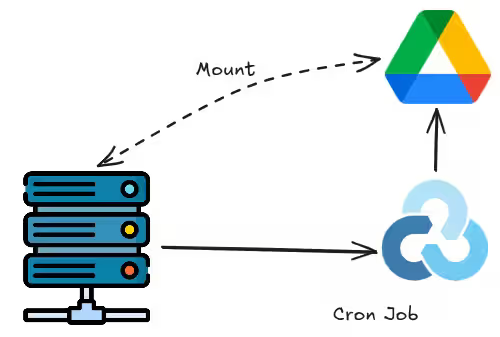
Until recently, my backup routine was simple: tarring files and using rclone copy to push them to Google Drive. However, I recently learned that directly tarring an active database may cause data corruption. While the safest workaround is to stop the service before performing the backup, that feels a bit clunky and disruptive. To solve this, I modified my script for a cleaner approach.
By the way, since my current projects only rely on SQLite — without more complex ones like MySQL or Redis — I just took SQLite into account. Maybe I’ll add PGP encryption and support for other databases in the future.
1 Configuring Rclone
Run the official Rclone installation script and rclone config to config corresponding cloud drive. I’m sure that’s esay to you so I’ll skip this part :-)
2 The Backup Script
The script compressing Nginx configurations, Docker data and most files in home directories, while retaining the last 5 days of backups. The logic to handle db is straightforward: it scans for specific file extensions and utilizes SQLite’s native command to backup. Once the archive is uploaded to cloud, the script deletes all temp files generated during the process. And for sure, you need to sudo apt install sqlite first.
#!/bin/bash

DATE=$(date +"%Y%m%d_%H%M%S")
BACKUP_TEMP_DIR="/root/backup_tmp"
ARCHIVE_NAME="netcup_backup_$DATE.tar.gz"
RCLONE_REMOTE="gdrive:Backups/netcup"
RETAIN_DAYS=5

USER_HOME="/home/user"    # alter to your username
BACKUP_PATHS="/opt/docker /etc/nginx $USER_HOME/src"

mkdir -p "$BACKUP_TEMP_DIR"

SAFE_FILES_LOG="$BACKUP_TEMP_DIR/safe_files.txt"
EXCLUDE_FILE_LIST="$BACKUP_TEMP_DIR/exclude_list.txt"
touch "$SAFE_FILES_LOG" "$EXCLUDE_FILE_LIST"

echo "=========================================="
echo "generating db copy..."
echo "=========================================="

find /opt/docker -type f \( -name "*.db" -o -name "*.sqlite" -o -name "*.sqlite3" \) | while read -r file_path; do
        SAFE_COPY_PATH="${file_path}.bak"

        echo "Safely backing up: $file_path -> and generating .bak copy"
        sqlite3 "$file_path" ".backup '$SAFE_COPY_PATH'"

        if [ -s "$SAFE_COPY_PATH" ]; then
            echo "$SAFE_COPY_PATH" >> "$SAFE_FILES_LOG"
            echo "$file_path" >> "$EXCLUDE_FILE_LIST"
            echo "${file_path}-wal" >> "$EXCLUDE_FILE_LIST"
            echo "${file_path}-shm" >> "$EXCLUDE_FILE_LIST"
        else
            echo "⚠️Warning: $file_path failed to generate db copy!"
        fi
done

echo "=========================================="
echo "tar..."
echo "=========================================="
if [ -f "$EXCLUDE_FILE_LIST" ]; then
    TMP_EXCLUDE=$(mktemp)
    while read -r banned_file; do
        if [[ "$banned_file" == *.db || "$banned_file" == *.sqlite || "$banned_file" == *.sqlite3 ]]; then
            if [ ! -f "${banned_file}.bak" ]; then
                continue
            fi
        fi
        echo "$banned_file" >> "$TMP_EXCLUDE"
    done < "$EXCLUDE_FILE_LIST"
    mv "$TMP_EXCLUDE" "$EXCLUDE_FILE_LIST"
fi

tar -czf "$BACKUP_TEMP_DIR/$ARCHIVE_NAME" \
    -X "$EXCLUDE_FILE_LIST" \
    --exclude="/home/user/.cache" \
    --exclude="/home/user/.npm" \
    --exclude="/home/user/.dotnet" \
    --exclude="/home/user/.local/share/GitKrakenCLI" \
    /etc/nginx \
    /opt/docker \
    /home/user \
    "$BACKUP_TEMP_DIR/safe_files.txt" \
    "$BACKUP_TEMP_DIR/exclude_list.txt" \
    --ignore-failed-read \
    --warning=no-file-changed

echo "=========================================="
echo "Uploading..."
echo "=========================================="
rclone copy "$BACKUP_TEMP_DIR/$ARCHIVE_NAME" "$RCLONE_REMOTE" -P
UPLOAD_RESULT=$?

echo "=========================================="
echo "Cleaning up local temp files..."
echo "=========================================="
if [ -f "$SAFE_FILES_LOG" ]; then
    while read -r safe_file; do
        rm -f "$safe_file"
    done < "$SAFE_FILES_LOG"
fi

if [ $UPLOAD_RESULT -eq 0 ]; then
    echo "Upload success!..."
    rclone delete "$RCLONE_REMOTE" --min-age "${RETAIN_DAYS}d"
    rm -rf "$BACKUP_TEMP_DIR"
    echo "Done!"
else
    echo "Failed!"
    rm -rf "$BACKUP_TEMP_DIR"
    exit 1
fi
3 Setting Up the Cron Job
Run the script as root user for convenience.
First, install crontab:
sudo apt update && sudo apt install cron -y
sudo systemctl enable --now cron
Edit task:
30 3 * * * /bin/bash /root/scripts/backup.sh >> /var/log/vps_backup.log 2>&1You can set the trigger time to the next minute to check the effect, and check the log:
tail -f /var/log/vps_backup.log