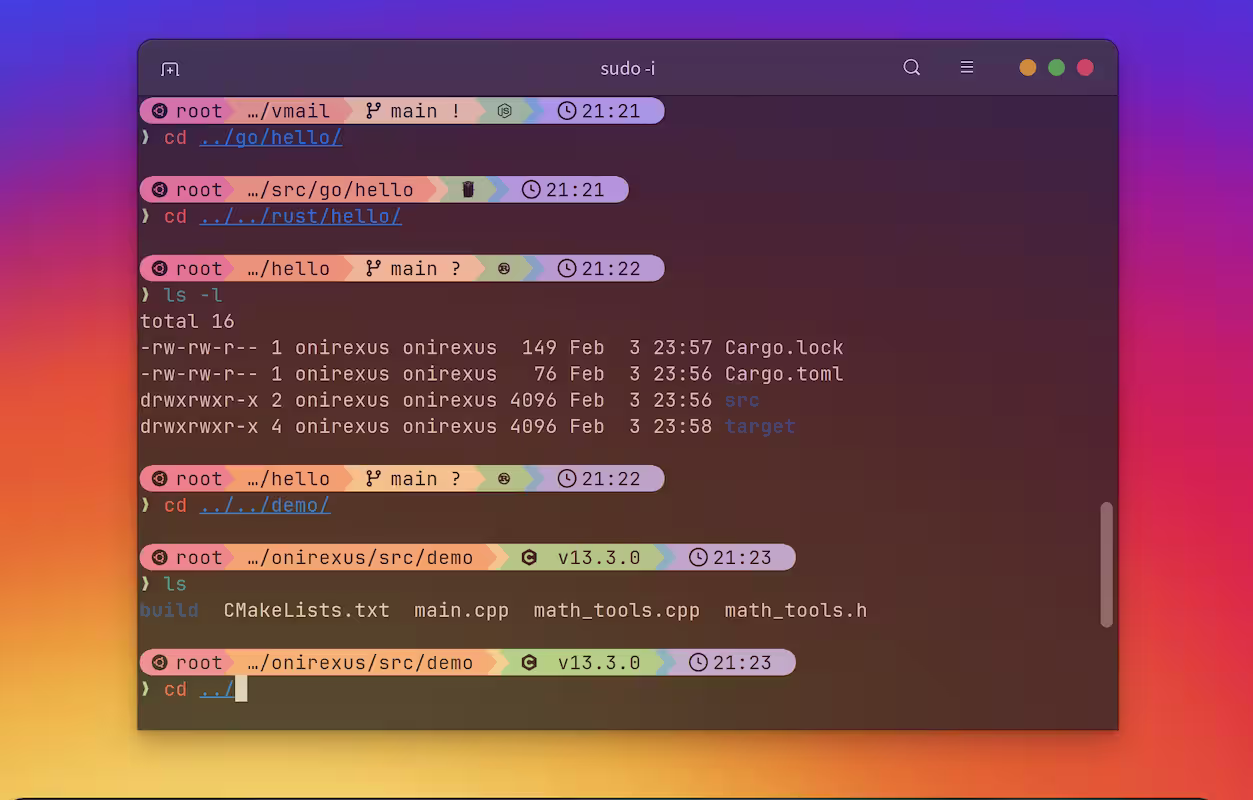
The default Linux terminal prompt is often plain and inconvenient, making terminal beautification a highly rewarding task. While most online tutorials focus heavily on oh-my-zsh, running complex Bash scripts under Zsh can occasionally introduce syntax bugs. That’s why I stick to Bash. My lightweight yet powerful combo of choice is starship + ble.sh.
All configuration steps below are performed on the VPS, not your local machine (except for installing the font in the final step).
Here is my end result, and it feels incredibly smooth.

1 Forcing a Color Prompt
By default, many Linux distributions ship with a monochrome (black and white) prompt. This step ensures that at least your username and hostname are highlighted in color.
Open your ~/.bashrc, find the force_color_prompt variable, and set it to yes. If it doesn’t exist, append the following snippet:
force_color_prompt=yes

if [ -n "$force_color_prompt" ]; then
    if [ -x /usr/bin/tput ] && tput setaf 1 >&/dev/null; then
        color_prompt=yes
    else
        color_prompt=
    fi
fi
Then source ~/.bashrc.
2 ble.sh
ble.sh brings syntax highlighting and auto-completion to standard Bash. Download and install it using the following commands:
curl -L https://github.com/akinomyoga/ble.sh/releases/download/nightly/ble-nightly.tar.xz | tar xJf -
mkdir -p ~/.local/share/blesh
cp -Rf ble-nightly/* ~/.local/share/blesh/
rm -rf ble-nightly
Note: This installation applies only to the current user, not globally.
In ~/.bashrc add:
[[ -f ~/.local/share/blesh/ble.sh ]] && source ~/.local/share/blesh/ble.shTo enable intelligent searching, add this in ~/.blerc:
cat << 'EOF' > ~/.blerc
ble-bind -f 'up' 'history-search-backward'
ble-bind -f 'down' 'history-search-forward'
EOF
We all know the standard arrow keys let you cycle through history. However, this bind introduces prefix-based searching. For example, if you type curl and press the Up arrow key, it will only cycle through past commands that start with curl.
3 starship
Starship is a minimal, blazing-fast, and infinitely customizable prompt for any shell. It instantly modernizes your command line interface.


Run the official installation script:
curl -sS https://starship.rs/install.sh | sudo sh -s -- -yIn ~/.bashrc add:
if command -v starship &> /dev/null; then
    eval "$(starship init bash)"
fi
Tip: If you are using ble.sh, make sure the Starship initialization block is placed below the ble.sh line.
Starship comes with various preset themes, or you can craft your own configuration:
mkdir -p ~/.config

# list available presets
starship preset --list

# apply one
starship preset catppuccin-powerline > ~/.config/starship.toml
Preview different presets here: https://starship.rs/presets/
Keep in mind that many themes rely heavily on special glyphs. You must install a Nerd Font in your local terminal emulator; otherwise, the icons sent by the VPS will render as broken characters.
I highly recommend picking up a font like JetBrains Mono Nerd Font from Nerd Fonts - Iconic font aggregator, glyphs/icons collection, & fonts patcher and setting it as the default font in your local terminal app.
Finally, reload your shell configuration: source ~/.bashrc.
Bonus: All-in-One Automated Script
I have wrapped up the entire process into a single script. After execution, remember to manually run source ~/.bashrc to apply the changes.
#!/bin/bash
curl -sS https://starship.rs/install.sh | sh -s -- -y
curl -L https://github.com/akinomyoga/ble.sh/releases/download/nightly/ble-nightly.tar.xz | tar xJf -
mkdir -p ~/.local/share/blesh
cp -Rf ble-nightly/* ~/.local/share/blesh/
rm -rf ble-nightly

cat <<EOF >> ~/.bashrc
force_color_prompt=yes

if [ -n "\$force_color_prompt" ]; then
    if [ -x /usr/bin/tput ] && tput setaf 1 >&/dev/null; then
        color_prompt=yes
    else
        color_prompt=
    fi
fi

[[ -f ~/.local/share/blesh/ble.sh ]] && source ~/.local/share/blesh/ble.sh

if command -v starship &> /dev/null; then
    eval "\$(starship init bash)"
fi
EOF

cat << 'EOF' > ~/.blerc
ble-bind -f 'up' 'history-search-backward'
ble-bind -f 'down' 'history-search-forward'
EOF

mkdir -p ~/.config
starship preset catppuccin-powerline > ~/.config/starship.toml